

Telegram is an instant messaging application with a very clear vision: to offer security, speed, and versatility. Although it's known for its chats, its encryption and data management capabilities have made it an essential tool. Unlike other apps, Telegram allows handling large files, positioning itself as a robust alternative to other communication clients.
Many users have discovered that this social network can be used to store photos, videos, and documents in the cloud for free . As a cloud-based service, the information is accessible from any device where you log in. This makes it an excellent alternative to Google Photos , Google Drive, or Dropbox, especially when the free storage limits of these services become insufficient.
Why use Telegram as a virtual hard drive?
Storage is a limited resource on our mobile phones; while some Android interfaces allow microSD cards, iPhones cannot expand their physical memory. Telegram breaks this barrier by offering virtually unlimited file storage . While other apps limit uploads to 100 MB, Telegram allows uploads of up to 2 GB each in its free version, and up to 4 GB with Telegram Premium.
This means you can save everything from high-resolution RAW photos to APK app installers or large videos without them taking up space on your phone's internal storage. If you delete the file from your device but keep it on Telegram, you'll free up actual space on your phone without losing access to the data.
Privacy and Security: What you should know
Before uploading your entire digital life, it's crucial to understand how privacy works. Telegram uses client-server encryption by default. This means that data travels securely to the company's servers, but remains unencrypted there to enable features like global search and multi-device syncing.
Unlike secret chats , which have end-to-end encryption but are only visible on the device where they were created, saved channels and messages are accessible from anywhere because they are stored in the Telegram cloud. Therefore, it is not recommended to store extremely sensitive information (such as passwords or bank details) without an extra layer of protection, as the company could technically access the content if necessary.
How to save your photos, videos, and files on Telegram

There are two main ways to do this: using the "Saved Messages" chat (which is basically a chat with yourself) or creating private channels and groups . The second option is recommended if you want to organize your content by categories, functioning like virtual folders.
With a private channel, you have a free and organized space to store multimedia and documents, all just a click away. If you already have the app, you can get started now; otherwise, download it from the Play Store.


How to create a private channel step by step
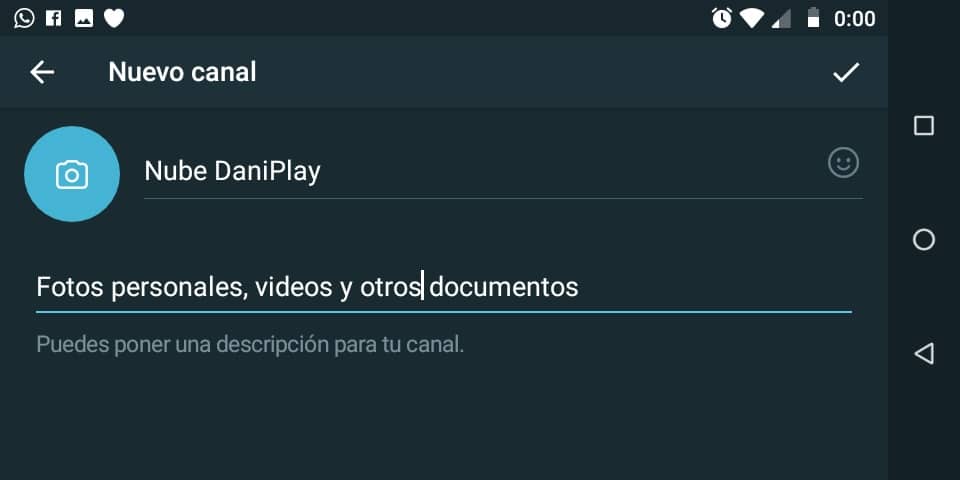
To set up your own storage space on Android, follow these detailed steps:
- Open the Telegram app on your mobile device.
- On the main screen, press the pencil icon located in the lower right corner (on iOS it is usually in the upper right corner).
- Select option "New Channel".
- Assign a name and descriptionFor example, you can call it "My Photo Cloud" or "Work Documents" to easily identify it.
- Choose the channel type: select "Private"This is essential to prevent anyone else from accessing your personal files. Press OK.
- When the app asks you to add subscribers, don't add anyoneSimply press the blue arrow to finish. Now you have a channel where it's just you.
File management: Uploading and organization
Once the channel is created, you can start uploading content to have an immediate backup. To do this, open the channel and tap the paperclip icon next to the text box. From here you can attach:
- Gallery: Photos and videos in original resolution.
- Records: PDFs, Word, APKs or any document.
- Others: Locations, music, and voice notes.
Advanced tricks for organizing your Telegram cloud
Since Telegram does not have a traditional folder system like Drive or Dropbox, it is necessary to use organizational strategies:
- Multiple groups/channels: Instead of just one chat, create several. For example: one for "Invoices," another for "Vacation Photos," and another for "Favorite Apps."
- Use of Hashtags (#): This is the most powerful tool. When uploading a file, include a hashtag in the message. Example: #MadridTrip2024Later, when you use the Telegram search engine and type that hashtag, the app will show you all the files tagged with it, regardless of the date.
- Pinned Messages: If you have a document that you consult daily, press and hold the message and select "Pin up"A bar will appear at the top of the chat that will take you directly to that file.
- Search by type: If you tap on the channel name at the top, you'll access a summary where Telegram automatically categorizes all content into tabs. Multimedia, Files, Links and GIFs.
How to view content in gallery mode
When you have hundreds of images, scrolling can be slow. To see everything visually:
- Enter your private channel.
- Click on the channel name on top.
- In the drop-down menu, select the tab for MultimediaYou'll see all your photos and videos organized in a grid similar to your phone's gallery.
Telegram is not just a messaging tool, but a complete ecosystem. By integrating a native music player, you can even create your own audio library in the cloud and listen to your songs or recordings directly from the app without permanently downloading them to your device. This flexibility, combined with the absence of monthly storage fees, makes Telegram the ideal solution for those seeking efficient, multi-device, and free digital backup.
Table of Contents