

If you're one of the lucky ones who can afford a Samsung Galaxy S8 or S8 Plus and you're worried about the red screen issue that's been making headlines lately, rest assured that Samsung itself has confirmed this is not a hardware problem or defect, but a simple configuration issue that can be easily fixed by going into the Android settings.
Although I'm not in favor of buying this new Samsung phone, however beautiful it may seem, and as I explain in this other article, I personally believe it's the perfect time to buy a Samsung Galaxy S7 or S7 Edge at a very good price, below I'll explain the reason for these mysterious red screens on some Samsung Galaxy S8 and S8 Plus phones, as well as how to fix the problem from the settings of both devices.
Why the red screens of some Samsung Galaxy S8?
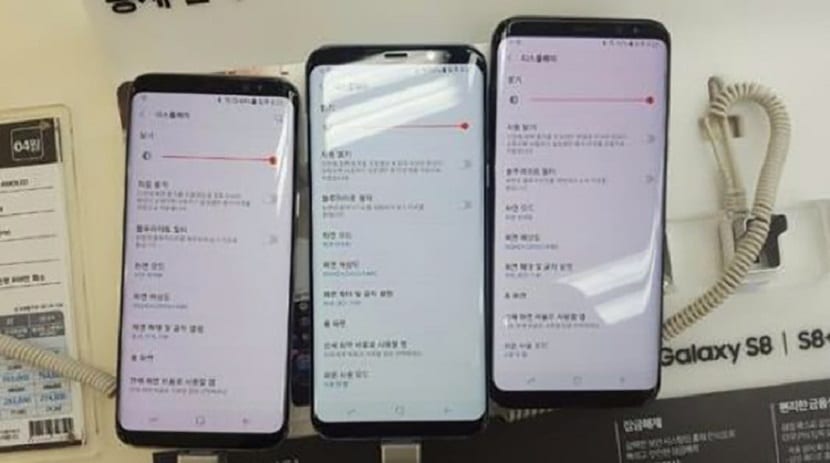
According to a recent statement from the Korean multinational itself, the so-called red screen problems of the Samsung Galaxy S8 and S8 Plus are not problems in themselves, but rather a special characteristic of these screens with SuperAMOLED technology that Samsung has been using in its Android terminals for quite some time.
Thus, this "supposed" reddish tint problem on the screens of some Samsung Galaxy S8 and S8 Plus is a problem that occurs in the screen settings when adaptive mode is selected , a screen mode specially designed for these screens with SuperAMOLED technology, which literally adapts the screen tone according to the environment in which we are using our Smartphone at any given time.
Although, personally, as a Samsung Galaxy S6 Edge Plus user, I find this explanation from Samsung somewhat vague, since my Samsung doesn't exhibit that red tint when I enable the adaptive display option in the device's display settings, we have to give them the benefit of the doubt and wait to see what users affected by this red screen issue on some Samsung Galaxy S8 and S8 Plus models have to say in the forums. It's worth remembering that we're talking about a device that launched with a starting price where the most basic model costs over 800 Euros.
What I mean is that, given the price at which these high-tech products are being sold, there is no room, or should be no room, for these supposed failures or bad system configurations.
Devices at these luxury prices should be sold in pristine condition , having passed a thorough quality control check and ready for normal use without having to search through and access system settings to fix what is undoubtedly a misconfiguration or malfunction of these screens affected by the reddish tint problem.
How To Fix Samsung Galaxy S8 Red Screen Problem According To Samsung
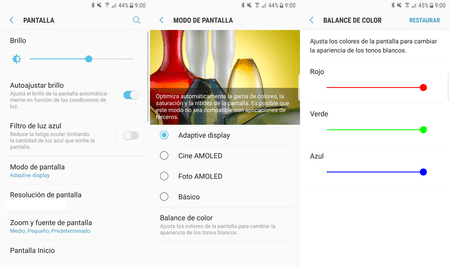
If you're lucky enough, or unlucky enough, to have your Samsung Galaxy S8 or S8 Plus arrive with this red screen issue that looks like it came straight from the depths of hell , don't worry. According to Samsung, this isn't a problem in itself, as it can be solved by going into Android settings, then to Display , Screen mode, Color balance, and disabling Adaptive Display mode to manually select the screen color.
If this is indeed how it's fixed, which I have no doubt about since I don't have the good fortune or misfortune of owning a Samsung Galaxy S8 to test it personally, my question is: What is the purpose of this adaptive mode, which clearly doesn't work well in the case of the Samsung Galaxy S8 and S8 Plus?
Being inherently suspicious and always assuming the worst, especially given Samsung's history of recent and not-so-recent problems , I think these Koreans are trying to pull the wool over our eyes once again. This is nothing more than a delaying tactic to hide what I'm certain is another serious problem or blunder they desperately want to conceal by forcing us to manually adjust the screen on the Samsung Galaxy S8 and S8 Plus.
In short, if you're going to buy, are thinking of buying, or have already bought a Samsung Galaxy S8 or S8 Plus, be aware that even though it has an adaptive screen mode, this mode is useless because to solve this red screen problem, if your Samsung Galaxy S8 suffers from this issue, you'll have to adjust the screen tones manually.
Table of Contents