

TDT Channels Player allows Android tablet and mobile users to watch television channels completely free of charge. It functions as an IPTV system, using a special internet protocol, different from streaming services but with similar functionality. It loads channels available on the web to play their content directly on Android.
The app has been around for a while, but it was recently updated, and it took almost two months to launch with a new name. TDT Channels Player offers a wide variety of free online TV channels and poses no legal risk to users. It's a reliable app, available for direct download from the developer's website or on the Google Play Store. We'll tell you how to install it, load the channels, and start enjoying your audiovisual content in seconds.
The best of public television on your mobile with DTT Channels Player
There is a wide selection of television channels that offer online viewing options in addition to cable and antenna . Applications like Tivify or DTT allow you to capture these online signals and play them as if they were streaming services like HBO Max or Netflix. Setup and compatibility are straightforward; the only configuration required is updating the channel lists.
In its latest version, TDT Channels Player installs and opens with a completely clean interface . Users must manually load channels via m3u playlists or IPTV lists. In previous versions, the app came pre-loaded with channels, but to avoid any legal issues, the developers made some changes. Now, after installing the app, you must download the TDT Channels IPTV list. This open-source list includes links to the channels, which are automatically loaded for selection. This is an additional step to prevent any complaints about "facilitating access to content." The app functions exactly the same as before, but now an annual update of the channel list is required.
TDTChannels is, in fact, one of the veteran apps within the Android ecosystem for accessing free-to-air television. Its appeal rests on three key pillars: a lightweight and well-optimized app, a constantly updated public channel list, and a simple user experience where you simply choose a channel to start watching. With the app configured, users have live access to most free-to-air channels broadcasting via DTT, including national, regional, and local channels, as well as a vast catalog of radio stations.
One of the biggest advantages over other alternatives is that all the content is offered free of charge and without registration . You won't find any premium or subscription channels: TDTChannels simply compiles into a playlist the public links that the networks themselves use to broadcast online. This means it's a free, legal solution for the user, with no payment complications.

Configure DTT Channels step by step
To start enjoying live public television content from Android, simply follow these instructions:
- Download the DTT Channels Player application from the Google Play Store or on the official website.
- In the lower menu you will find the option Playsits (Playlists).
- Press the + button in the upper right area of the screen.
- Copy the link to the JSON list on the official TDT website.
- Paste the link in the URL section of the list and choose a name.
- Return to the home screen of the app and choose the channel you want to watch.
If you want to listen to radio stations in addition to watching TV, the procedure is identical: you'll need to add the corresponding radio list as a new playlist in the same section. The app keeps your TV and radio favorites separate, so you can create custom lists with your preferred stations and access them much faster without having to browse through the entire channel guide.
It's important to remember to periodically check that the lists are still active and update them if necessary . The app uses the official list published on the project's website, so simply visit the page to copy the JSON link again and replace it if any channel's address has changed.
What does IPTV mean and what does it do?
IPTV , or Internet Protocol Television , is a method for streaming content. Unlike other methods, it utilizes the broadcasts of each channel's signal for streaming and on-demand reception. The protocol differs because it creates a private network, linking the user on one side to the television provider offering the channels on the other.
The user must synchronize their router or an activated set-top box to receive the data. The channels are transmitted on demand and also allocate a portion of the bandwidth exclusively for this function. This way, the remaining bandwidth is available for traditional browsing and using other applications.


Dividing the bandwidth and allocating a percentage for use serves practical purposes. This allows the user to receive the signal with the best possible quality on each channel. The video is compressed using a special format and sent directly to the client's IP address, which has a private network already established using the IPTV protocol.
It's important not to confuse IPTV with traditional streaming services. While platforms like Netflix host content on centralized servers that are accessed on demand, IPTV broadcasts the signal that the channel makes available to the public live. Therefore, the experience is more similar to traditional digital terrestrial television (DTT): you choose a channel and watch what's currently airing, with the option, depending on the broadcaster, to pause or rewind the broadcast.
Does using IPTV and the DTT Channels Player app have advantages?
The DTT Channels Player proposal is excellent for enjoying the best content from public television channels on your mobile. The IPTV lists include the IP addresses to view the channels in the best resolution, without restrictions and simultaneously. What DTT does is load the m3u or IPTV list format, identify the address of the channel and take it to your mobile.
Then, simply browse the channel lineup and select the content you want to watch. Whether you download the official version from the Google Play Store or use the APK file from the official website, there's no excuse not to enjoy the best TV content on your mobile device.
Compared to other alternatives, TDT Channels Player stands out for its stable performance, user-friendly interface, and constantly growing catalog . The app allows users to save favorite channels, filter by region, consult the program guide (EPG), and cast content to a TV with Chromecast or Google Cast with a single tap. It also features a dark mode and smooth navigation, which is especially convenient when using a TV remote.
Another notable advantage is that the application is frequently updated , incorporating performance improvements, bug fixes, and new features regularly. This makes it a dynamic and constantly evolving platform, maintained by its developer and supported by an active user community that reports issues and suggests improvements.
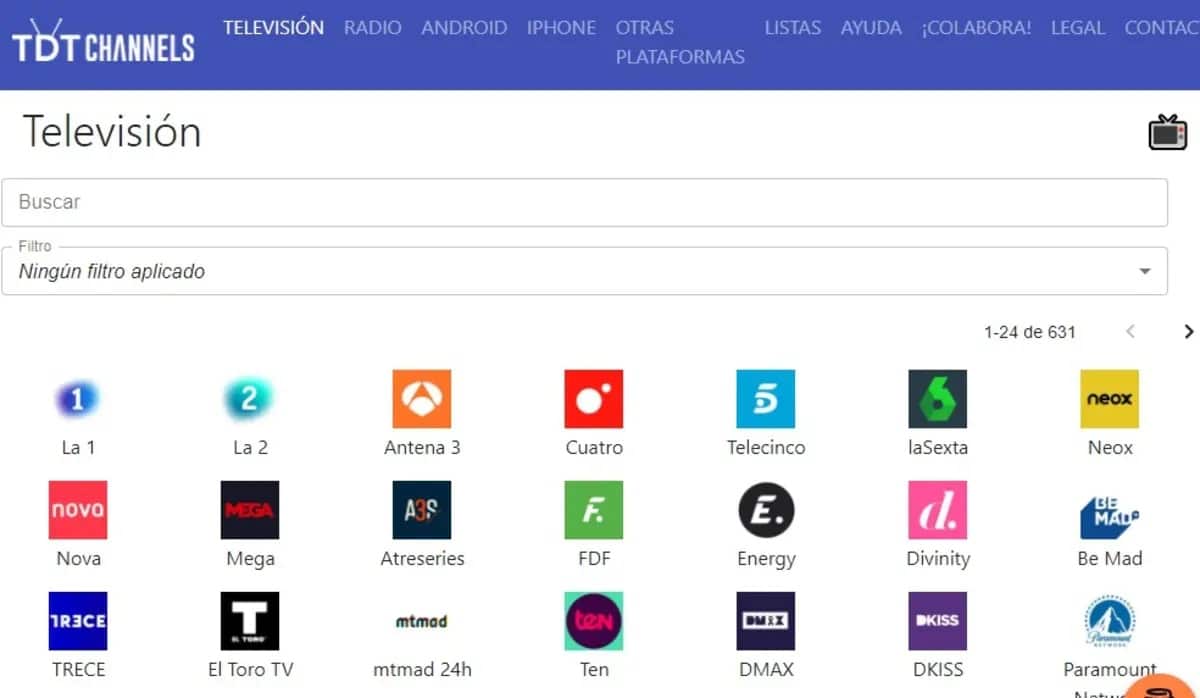
What channels and stations can I watch with TDT Channels Player?
The list of TV channels and radio stations is truly extensive, covering virtually all of digital terrestrial television (DTT). TDTChannels provides access to hundreds of TV channels and hundreds of radio stations in Spanish and internationally, all with live streaming through the app. While a channel might occasionally go down, it's not common: the app offers most national, regional, and local channels, as well as radio stations from those areas. Furthermore, the list includes the EPG (Electronic Program Guide) with the programming schedule for each channel.
Among the most important generalist networks that can be found, the following stand out:
- La 1, La 2, Clan, Teledeporte and Canal 24H.
- Antena 3, La Sexta, Atreseries, Nova, Neox and Mega.
- Telecinco, Cuatro, FDF, Boing, Divinity, Energy and Be Mad.
- Disney Channel, Paramount Network, DMax, Gol Play, Trece TV, DKiss, Ten and Real Madrid TV.
In addition to the main channels, a number of regional networks are also available , including those from Andalusia (Canal Sur, Canal Sur 2, Andalucía TV), Aragon (Aragón TV), the Balearic Islands, the Canary Islands (TV Canaria), Castile-La Mancha, Castile and León (CyLTV, La 8), Catalonia (TV3, 3/24, Super3/33, Esport3, Barça TV), Madrid (Telemadrid, La Otra), the Valencian Community (À Punt, 8 Mediterráneo), Extremadura (Canal Extremadura), Galicia (TVG, TVG2), La Rioja (TVR, La 7 Rioja), Murcia (7RM, TV Murciana), Navarre (Navarra Televisión), and the Basque Country (ETB1, ETB2, ETB Deportes). In all cases, the channels are broadcast live and in the best available quality.
The radio section also offers a huge variety: national, regional, and local stations, many with their own EPG. The app keeps radio and TV lists separate , which makes navigation much easier and allows you to have different favorites in each category.

Compatibility: On which devices does TDT Channels Player work?
Although the official version of TDT Channels Player is designed for Android, the project can be enjoyed on virtually any current device. These are the most common systems and platforms:
- Android phones and tablets: It is the app's native environment, with support from Android 6 or higher and optimization for the latest system versions.
- Android TV and Google TV: The app can be installed directly from the TV's app store or via the "Install on more devices" option. It works with both remote controls and touch controls.
- Amazon Fire TV and Fire Stick: You can install the Android TV version manually (sideload) using the APK file with Downloader or ADB, or access it through the Silk browser. Please note that some subscription features may not be available in this environment.
- Smart TVs from Samsung, LG, Sony, Philips and similar brands: Simply open the TV's browser and go to the project's official website, or load the M3U/M3U8 list into a compatible IPTV app such as Smart IPTV, SS IPTV, Kodi, or Tivimate.
- Computers with Windows, macOS, and Linux: It can be viewed from a modern browser such as Chrome, Edge, Firefox or Safari, or using players such as VLC (File > Open network location), Kodi with IPTV Simple Client, MPV or Totem.
- chromecast: You can send the broadcast from your mobile phone or play it directly from the Chrome or Edge browser by pressing the cast icon.
- PlayStation and Xbox consoles: Simply open the built-in browser (Edge or Web Browser) and access the official website; the channels play directly without plugins.
- Raspberry Pi and Linux Box: By installing a compatible IPTV player, the list can be integrated without any problems.
This broad compatibility is one of the project's greatest strengths: it doesn't matter if you have a basic mobile phone, an older tablet, or a state-of-the-art television. And if your device isn't on the main list, you can always use the official website or the M3U/M3U8 playlist to load it into your favorite IPTV player. For Android devices with Google Cast, you don't even need to install the app on your TV: you can simply cast the stream from your phone.
Is it legal to use TDTChannels?
The app is completely legal , as is the channel list that compiles various television and radio broadcasts. TDTChannels simply gathers public and open links that broadcasters use to stream over the internet into a single playlist. Premium or subscription channels are not offered under any circumstances: you won't find any of that on TDTChannels.
It's important to understand this difference: the app doesn't broadcast or host its own content ; instead, it acts as a player that reads the public URLs that each network publishes for online viewing. That's why the developers ask users to manually load the list and update it as needed, to make it clear that it's a compilation of links that are already publicly accessible.
In this regard, TDTChannels is also opposed to piracy : all the broadcasts it includes come from official and free sources, something that the app and its website emphasize in various notices. It is, therefore, a safe alternative, without registration and without hidden costs.
Tips and troubleshooting for using DTT Channels Player
To get the most out of the application, it is advisable to keep in mind a series of recommendations that will help you avoid the most common problems:
- Keep the app updated: New versions typically include performance improvements, bug fixes, and compatibility with the latest Android versions.
- Update channel list: If any channel appears to be down or displays an error, check that there is no new list available on the official website.
- Try alternative streams: Some broadcasts have more than one link available; if one fails, simply select another from the channel's information page.
- Check your connection: Although IPTV optimizes bandwidth, a stable Wi-Fi connection is recommended for viewing high-resolution content.
- Control your mobile data usage: The app allows you to activate a verification that alerts you if a broadcast is about to be played using mobile data, which is useful to avoid wasting data without realizing it.
- Use favorites: Saving your favorite channels greatly reduces the time it takes to find what you want to watch.
- Close the app completely: If you're watching something and exit, the app will ask for confirmation before closing completely, which is especially useful on Android TV.
If a channel isn't working, it's most likely because the broadcast itself is down at that moment: remember that the app uses public third-party links and doesn't control the signal's stability. In most cases, the problem is solved by waiting a few minutes, trying an alternative link, or changing the channel and re-entering the app. You can also check the app's release notes to see if the development team has fixed any issues related to a specific channel.
Alternatives for watching DTT online on Android
While TDT Channels Player is one of the most comprehensive options, it's not the only one. Apps like Tivify offer a similar experience with free-to-air channels and, in some cases, paid plans with extra features. Other alternatives include generic IPTV players such as Kodi, VLC, Tivimate, Smart IPTV, or SS IPTV, which allow you to load any M3U playlists you want, including those from TDT Channels.
The main advantage of TDTChannels over most others is its catalog, the frequency with which the list is updated, and its availability on so many platforms . And all of this is completely free for the user and requires no account creation. If you prefer to watch content from your computer, you can also use the web version of the project, which is updated as frequently as the app and offers the same programming schedule.
If there's one thing TDT Channels Player makes clear, it's that watching free-to-air TV on Android has never been easier. With a lightweight app, a huge catalog of TV and radio channels, support for virtually any device, and a constantly updated public list, you have all of free-to-air TV at your fingertips. It only takes a few minutes to install, paste the JSON link, and start enjoying your favorite channels live, for free, without registration, and legally.
Table of Contents
- 1 The best of public television on your mobile with DTT Channels Player
- 2 Does using IPTV and the DTT Channels Player app have advantages?
- 3 What channels and stations can I watch with TDT Channels Player?
- 4 Compatibility: On which devices does TDT Channels Player work?
- 5 Is it legal to use TDTChannels?
- 6 Tips and troubleshooting for using DTT Channels Player
- 7 Alternatives for watching DTT online on Android