

We spend many hours a day using our mobile phones , whether to answer messages, check email, or do work. Prolonged screen time can lead to digital dependency, which affects our productivity, academic performance, and, above all, our health. It's essential to set time limits on smartphones , both for ourselves and our children, to avoid problems such as eye strain , headaches, and sleep disorders.
Although there are several time management apps available on the Play Store, the EMUI customization layer , found on Huawei and Honor devices, offers a powerful built-in tool. This feature, called Digital Balance , is Huawei's answer to Google's Digital Wellbeing , allowing for comprehensive control of the mobile ecosystem without the need for external software.

How to put a limit on the time you use your mobile in EMUI
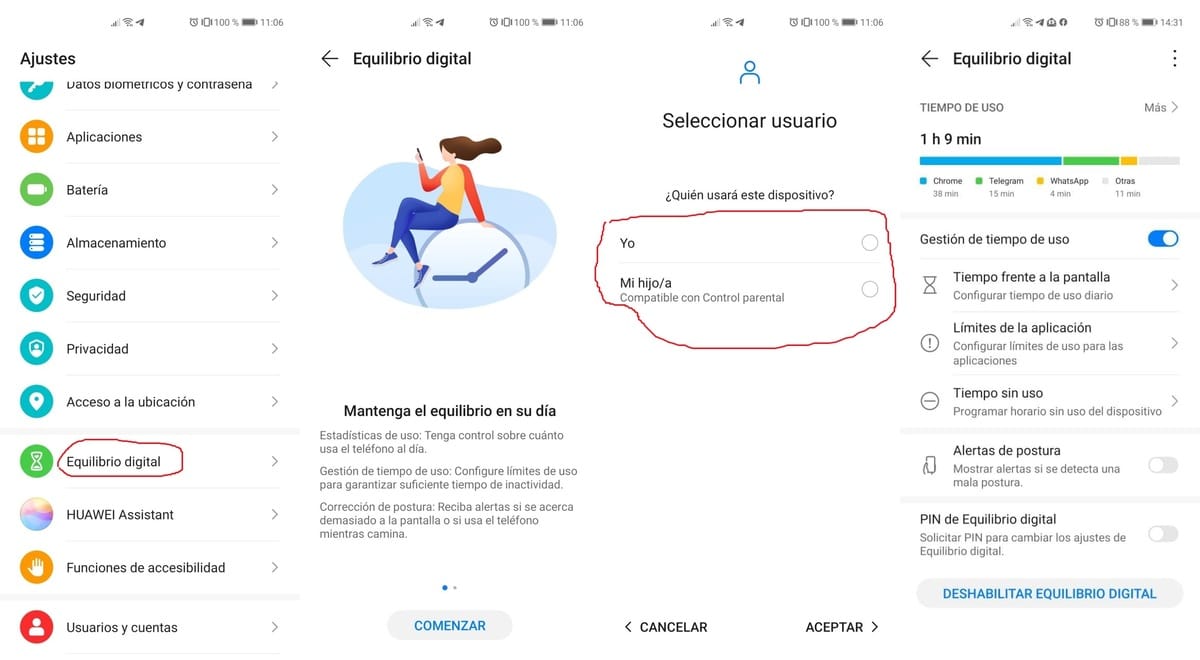
Huawei and Honor users can use Digital Balance to limit the usage time of a specific app or the entire device. This tool allows users to create configurable rules, setting permitted access times and restricted periods, which is ideal for maintaining focus during work or study.
The tool is intuitive and offers two main profiles: "Me" or "My Child" . If you select the child profile, the system activates advanced parental controls that allow you to restrict not only screen time, but also access to certain websites and apps inappropriate for minors.
To configure the time limit in EMUI , follow these detailed steps:
- Access the menu Settings of your Huawei or Honor device.
- Search and select the option "Digital balance" and press the Start button.
- Choose the right profile: "Me" for self-management or "My son/daughter" for supervision.
- Activate the "Usage time management"Here you can configure screen time filters and specific limits per application.
- Configure the "Posture alerts"which will alert you via message if you are using the phone in an incorrect position to avoid neck pain.
- Establishes the Digital Balance PINThis code is essential to prevent minors from modifying restrictions or extending usage time without permission.

The system will provide you with detailed statistics. If you access the "More" option , you can see the apps you use most , viewing the usage time for "Today" and the history of the last seven days, broken down by apps like WhatsApp, Telegram, or the browser, allowing you to identify which apps are taking up the most of your time.

Advanced application management and control options
For those seeking more precise control, EMUI allows you to go beyond the general limit. Through Settings ➔ Digital Balance ➔ App Limits , you can assign a daily timer to each app. Once the time is up, the system blocks access and the app icon dims.
It's important to note that even when the app is blocked, notifications may still arrive , as the timer affects the app's opening but not the system's notification flow. If you need a complete, distraction-free block, the best option is to use "Downtime ," where you can add specific times (for example, from 10 PM to 8 AM) when the phone will be restricted.

For those using the device in work environments, it is recommended to limit messaging and social media apps. Once the workday is over, you can quickly deactivate these restrictions from the "Disable Digital Balance" option located at the bottom of the menu.
Alternatives and complementary tools for digital well-being
If EMUI's native tools aren't enough, there are several apps designed to help manage mobile phone addiction and improve mental health:
Parental Control Apps
- Google Family Link: It allows you to create children's accounts, manage downloads, and set daily limits from the parents' mobile phone.
- Custodio: It offers real-time monitoring, detailed activity reports, and call and message control.
- Screen Time: It includes a reward system where children can earn extra time by completing tasks.
- OurPact: Specializing in blocking distracting browsers and apps, prioritizing learning tools.
- Kidslox: It allows you to manage up to 10 devices simultaneously with age-based content filters.

Apps for Digital Detox for Adults
- forest: Gamify concentration; while you're not using your phone, a virtual tree grows.
- Focus Plant: Similar to Forest, but focused on botany and collecting virtual raindrops.
- Flipd: Create private study rooms to avoid procrastination through social support.
- headspace: Focused on mindfulness and meditation to reduce digital anxiety.
- Space: It offers personalized reduction plans and defines physical "disconnection zones".
- ActionDash: Provides a in-depth analysis of habitsnotifications and unlock frequency.
Health impact and expert recommendations
Excessive screen time isn't just a waste of time. Prolonged reading on mobile devices can increase visual symptoms , such as dry eyes and blurred vision, by up to 90%. Experts warn of a myopia pandemic , especially among children and teenagers.
The American Academy of Pediatrics suggests that children between the ages of 6 and 12 should limit their screen time to no more than two hours per day . To achieve this, it is vital that parents act as role models, establishing family digital rules and encouraging outdoor activities, reading physical books, and playing sports.

For effective control, it's advisable to keep bedrooms screen-free and avoid using devices during meals. The goal isn't to ban technology, but to find a healthy balance that allows you to enjoy the benefits of digital technology without compromising your physical and mental well-being.
Managing screen time responsibly through tools like Digital Balance in EMUI and the support of wellness apps allows us to regain control over our daily lives. Implementing these limits not only protects our vision and sleep but also improves the quality of human interactions and our ability to concentrate in a world saturated with constant stimuli.
Table of Contents
