

The vast majority of Android users have interacted, even if indirectly, with the term DRM and its licenses . These appear systematically every time we purchase premium apps, video games, movies, or digital books . Within this content protection ecosystem, many devices include an advanced feature called DRM reset , an option that often causes confusion when it appears in the system settings menus.
In this article, we thoroughly analyze what DRM reset is on Android , breaking down its technical workings, practical uses, real-world implications for digital content, and specific scenarios where it's highly recommended. We also delve into the architecture of DRM technology , the license management system, and the operating system's internal framework so you understand exactly what data is deleted when this feature is activated.
DRM Licensing in Android: Fundamental Concepts
DRM licenses have been a cornerstone of content distribution on Android for years. The acronym DRM stands for Digital Rights Management . It's not an isolated function, but a complex technology designed to protect intellectual property , preventing digital files from being copied, modified, or distributed without the author's or distributor's permission.
This system is implemented at both the software and hardware levels . Its primary objective is to combat digital piracy, ensuring that creators of music, series, films, software, and ebooks receive the corresponding financial compensation. To achieve this control, DRM uses encryption mechanisms and licenses that determine who can access the content, under what conditions, and for how long.
In the Android environment, these licenses manifest as digital certificates closely linked to the user account and device identifier. When you download a paid app from the Google Play Store or access protected multimedia content, the system generates a DRM license that performs three critical functions:
- Verification of legitimacy: Verify that the download or purchase was made legally and linked to an active account.
- Content integrity: Ensures that the file has not been manipulated or modified (thus preventing the insertion of malicious code or the removal of restrictions).
- Execution control: Prevents the content from working in unauthorized devices or outside the geographical and temporal limits established by the provider.

These licenses act as a certificate of authenticity . For the developer, it's a guarantee that their work won't be exploited illegally. For the user, it represents an additional layer of security , as it ensures that the application is genuine, comes from a controlled environment, and is free of malware.
Despite the usual criticisms regarding restrictions on user freedom, the implementation of DRM in Android has enabled a more secure download environment , reducing fraud and allowing developers to reach global audiences with the assurance that their work is protected. Each time the system attempts to open a DRM-protected file, it consults the locally stored license to validate that:
- The user owns the access rights through your account.
- The file is original and has not been altered.
- They are not being violated terms and conditions of use (such as the limit on simultaneous devices, usage time, or activation region).
What is DRM reset on Android?

The Android operating system is known for its versatile recovery and formatting options . While a factory reset erases the entire device, there are more precise functions that allow you to restore only specific aspects. This is where DRM Reset , or "DRM License Reset," comes in.
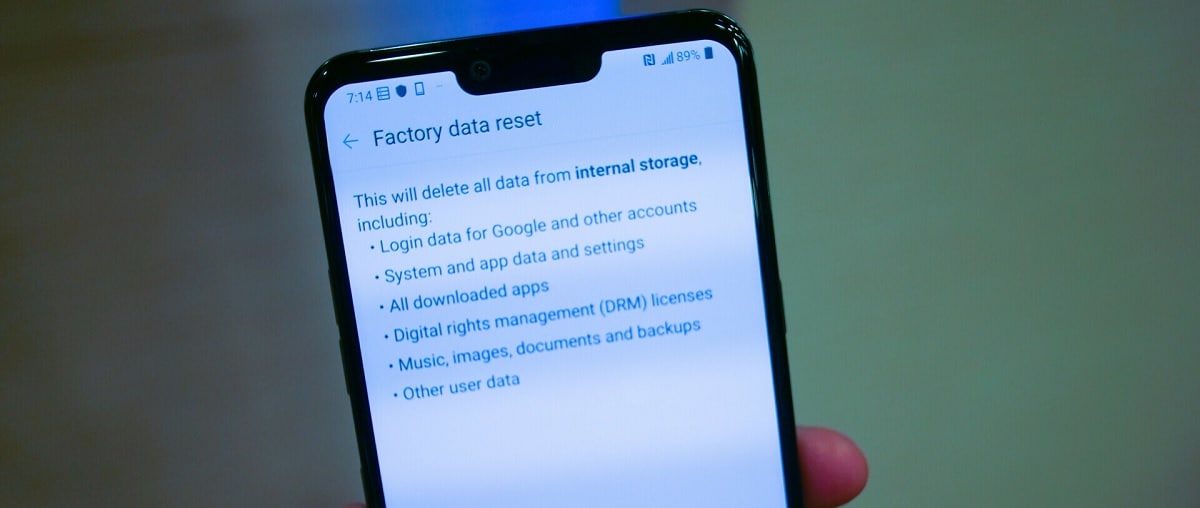
It's crucial to understand that this function is not a system format . It doesn't delete your photos, messages, contacts, or personal files. Its action is limited exclusively to removing the digital rights management (DRM) licenses stored in the device's memory. When you install protected content, access keys are saved locally to avoid having to connect to the server every second of use; the DRM reset deletes precisely those records.
When performing a DRM reset on Android, the following technical processes occur:
- Erasing cryptographic keys: Certificates and keys that allow decryption of protected content are removed.
- Revocation of validationThe system can no longer validate authenticity of locally protected apps or files.
- Cancellation of permitsAll access based on the local DRM, forcing the system to request new licenses if access to the content is desired again.
A key point is that the files don't disappear . If you have a paid game installed, the icon will still be there and the files will continue to take up space, but when you try to open it, the app won't find the necessary license to run and will display an authentication error. This tool is vital for managing privacy and security throughout the device's lifecycle.
What is DRM reset used for?

The primary goal of this feature is to sever the link between the device's hardware and the intellectual property licenses associated with an account. In practice, it is used in various critical scenarios:
Transfer, sale or donation of the device
When a mobile phone changes ownership, erasing personal data is the priority, but DRM reset is the final security measure . By removing the licenses:
- It is guaranteed that the new owner will not have access permissions to your purchases digital
- It prevents third parties from enjoying subscriptions or premium apps associated with your identity.
- It is protected digital privacysince licensing history can reveal preferences, consumption habits, and personal purchases.
Prevention of misuse and unauthorized access
In situations where the device is loaned out for extended periods or used in shared work environments, resetting the DRM prevents someone from illegally exploiting your paid licenses. It's a barrier against the unauthorized use of multimedia content or software.
Troubleshooting technical errors and validation failures
It's common for some apps or streaming services to display errors like "invalid license" or "failed to verify authenticity." These errors usually occur when local license files become corrupted or outdated . Resetting the DRM clears these faulty records, and after restarting the app or logging in, the system generates a new, working license, resolving the issue.
Maintenance after system modifications (Root and ROMs)
When a user decides to update the system, switch to a custom ROM , unlock the Android bootloader , root the device, or modify internal partitions, it's very likely that previous DRM licenses will become incompatible . A DRM reset allows you to clear the previous state to avoid validation conflicts and start fresh with the new software.
Response to security commitments
If you suspect that your account has been compromised or that the device has been manipulated to run modified apps, removing DRM licenses is a necessary reactive action to prevent the continued use of content under potentially compromised credentials.
Consequences and implications of restoring DRM

Before proceeding, it's crucial to understand that this action has direct effects on the functionality of your content. The most relevant implications are:
- Immediate loss of local accessWhen the keys are deleted, any content requiring DRM verification will instantly stop working. Depending on the service, you could face:
- Unexpected application closures.
- Obligation of return to log to download the license.
- Need to reinstall the entire application.
- In extreme cases and with very restrictive services, the need to repurchase the content if the provider does not allow license reissuance.
- Shielding digital privacyThis is the most positive consequence of giving away your phone. You ensure that the device is no longer linked to your purchase history or digital rights by leaving the device behind. "clean" in terms of intellectual property.
- Risk of permanent loss in restrictive servicesAlthough most Google Play purchases can be recovered by logging in with the original account, some providers limit the number of activations per device. If you reach that limit, removing the license could permanently block access if the provider doesn't offer a manual recovery process.
- Isolation of personal dataIt is vital to remember that the DRM reset It does not affect your filesYour photos, personal videos, contacts, and documents remain intact. This is not a substitute for a factory reset if your goal is to erase all your personal information.
To mitigate risks, it is recommended to follow these best practices :
- make a Backup complete device data.
- Verify that the accounts associated with the most valuable apps allow the simple reactivation.
- Check the license recovery policies of the streaming services or digital book stores you use.
How DRM works on Android at a technical level
To understand the magnitude of what is being deleted, we need to analyze Android's extensible DRM framework . This framework allows applications to manage protected content based on restrictions defined by various DRM schemes, abstracting the complexity for the developer.
Android offers a unified interface , meaning an app can interact with different systems like Widevine , PlayReady, or ClearKey without needing separate code for each. The device manufacturer decides which schemes to support, but Google guarantees at least one compatibility across the entire ecosystem.
The technical workflow of DRM follows this cycle:
- Encryption and PackagingThe content (video, app, ebook) is encrypted with cryptographic keys. Without the correct key, the file is an unreadable set of data.
- License IssuanceWhen purchasing the product, a license server It generates a certificate linked to the account and the device. This license contains the rules of use (time, quality, region).
- Safe StorageThe license is stored on the device, often in a protected hardware environment, and is synchronized with the cloud.
- Decrypted in Real TimeWhen the content is opened, the app requests the DRM keys from the framework. If the license is valid, the framework decrypts the content and delivers it to the player or executable.
- Restriction ControlThe system blocks unauthorized actions, such as trying to copy the video stream or move the app to an unauthorized device.
Architecturally, this system is divided into two main layers:
- DRM Framework APIThe top layer that applications use to acquire licenses and manage content.
- Native Code LayerThe lower part that communicates with the specific plugins from each DRM provider to apply encryption policies.
In addition, Android uses specialized components such as MediaDrm and MediaCrypto , which allow for the handling of encrypted data streams both in streaming mode and for offline consumption.
DRM plugins and architecture in Android
The system startup process is crucial. During boot, Android analyzes the services of the hardware abstraction layer (HAL) and discover the available DRM plugins, usually provided by the SoC manufacturer (such as Qualcomm or MediaTek). These plugins reside in the partition /vendor and are integrated through the service mediadrmserver.
To ensure interoperability, these plugins must implement standard interfaces based on AIDL (Android Interface Definition Language) , including:
- IDrmPlugin and ICryptoPlugin: Directly responsible for license management and the decryption process.
- IDrmFactory and ICryptoFactory: Responsible for instantiating the correct plugins according to the file's encryption scheme.
This modular architecture allows a single phone to support multiple DRM schemes simultaneously. It also leverages the processor's hardware security features , such as Secure Boot and decrypted frame protection, ensuring that premium content cannot be captured even if the system software has been compromised.
From this technical perspective, the DRM reset It does not alter the architecture or delete the plugins from the partition /vendor; simply clean the license database managed by the framework, leaving the device in an "unauthorized" state.
How to perform a DRM reset on Android step by step
Almost all modern Android devices include this option, although its exact location may vary due to each manufacturer's customization layers (such as MIUI, One UI, or ColorOS). However, the navigation logic is similar in most cases.
To perform a universal DRM reset , follow these steps:
- Access the application Settings or your device settings.
- Look for the section Backup and resetIf you don't see it, look for menus called "System", "General Administration" or "Maintenance".
- Locate the specific option called DRM reset or "Reset DRM licenses".
- Click on the option and carefully read the warning notice.
- Confirm the actionThe system will inform you that all stored licenses will be permanently deleted.
- If you have a security method set up, enter your PIN, pattern, password or fingerprint to authorize the process.
- Please wait a few seconds for the system to complete the cleaning. You will receive a confirmation message when it is finished.
Pro tip : If you're having trouble finding the option among so many menus, use the search bar in settings and type "DRM" or "licenses ." This will take you directly to the feature, regardless of your phone's brand.
DRM reset on Samsung phones (One UI)
On Samsung devices, the process is very standardized within their One UI interface . Follow this path:
- Sign in Settings.
- Navigate to General Administration (in older versions it may appear as "General Maintenance").
- Select the menu Resetting.
- Tap on DRM reset.
- Confirm the transaction and validate your identity using biometrics or PIN.
- The process will end in a few seconds, removing all local licenses.
Frequently asked questions, safety and best practices
To avoid unpleasant surprises and optimize the security of your content, we answer the most frequently asked questions about this feature:
- Will I permanently lose my purchases if I reset the DRM?
In the vast majority of cases, No.Play Store purchases are linked to your Google accountnot only to the hardware. To regain access, simply log in again and download the content. However, always check the terms and conditions if you use very restrictive third-party services that limit the number of activations. - Can I use the content on another device after deletion?
Yes, as long as the license is associated with your account. If the license was strictly device-specific (common in some very old apps), you might require manual reauthorization by contacting the provider's support. - Is it possible to back up DRM licenses?
No. For reasons of security and protection of rightsAndroid does not allow exporting DRM keys. The only "backup" is the provider's own cloud, from where you download the permission again upon logging in. - Does resetting DRM affect my photos or WhatsApp?
Absolutely No.This function is surgical and only affects license records. Your personal data, unprotected applications, and your own media files remain untouched. - Why doesn't my phone have the option to reset DRM?
Some very old devices, heavily stripped-down versions of Android, or Custom ROMs They may have removed this option from the menu. If that's the case, try updating your system or check if the manufacturer has omitted the feature on that specific model.
Final safety recommendations :
- Session closureBefore selling your phone, don't just reset the DRM; log out of all your accounts (Google, Netflix, Spotify, etc.) and unlink the device from your profiles.
- Avoid external toolsDo not use third-party applications that promise to illegally "break" or "remove DRM." These tools often contain malware and can result in your account being banned from official services.
- Constant updatesKeep your Android system updated. Improvements to the DRM framework not only protect the author but also optimize performance and the security of your own data.
It is crucial to remember that bypassing DRM to distribute or manipulate protected files can have legal implications depending on the laws of each country. DRM reset is a maintenance and security tool, not a method for infringing copyright.
Mastering DRM license management on Android gives you complete control over your device's digital identity. Whether you're fixing a persistent bug in a paid app, cleaning up your device before a sale, or ensuring privacy after a system update, DRM reset is a powerful feature that, when used wisely, guarantees your purchases and subscriptions are protected and your device is safe for future users.
Table of Contents
- 1 DRM Licensing in Android: Fundamental Concepts
- 2 What is DRM reset on Android?
- 3 What is DRM reset used for?
- 4 Consequences and implications of restoring DRM
- 5 How DRM works on Android at a technical level
- 6 DRM plugins and architecture in Android
- 7 How to perform a DRM reset on Android step by step
- 8 Frequently asked questions, safety and best practices
