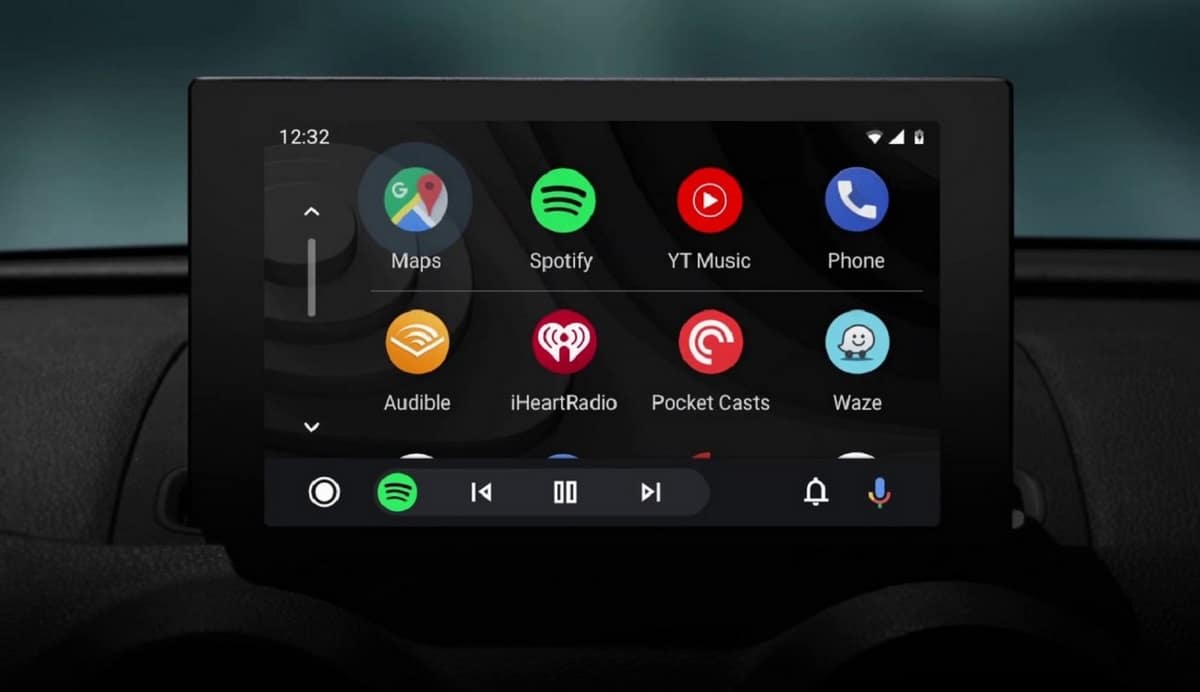
Android Auto stopped working as a standalone mobile app a few years ago, but an independent project has revived the idea. PhoneAuto allows you to open the full Android Auto interface on your phone's screen, without needing a compatible touchscreen in your vehicle. The app comes from a third-party developer and is distributed as a free application, although it's still in beta.
The goal is simply to offer a driving-focused experience. The app replicates the actual Android Auto design , with large buttons and shortcuts to the usual sections, and adapts to the device's dimensions similarly to the version displayed on the car's dashboard. However, it's not an official Google tool, so it should be considered an experimental alternative.
What PhoneAuto offers and how does it work

PhoneAuto is not just a simple launcher or a half-baked solution. It emulates and projects the complete system interface , integrating multitasking and access to Google Maps, music playback, calls, messages, and the voice assistant. This allows your phone to become a smart multimedia hub for your car without having to spend money on expensive audio equipment—a particularly practical option for those without a built-in screen.
For the application to function, it relies on a developer feature known as the head unit server . This Android Auto feature is typically used for testing and allows the system interface to run directly on the mobile device. The user needs to enable developer mode and start the corresponding server, although it's possible to automate part of the process using accessibility permissions.
Initial tests indicate solid performance. The interface responds well in landscape mode , which is the most common way to position a phone in a car. In portrait mode, however, there is a noticeable lag when interacting with it, a detail that could be corrected in future versions before the final release. It has also been noted that performance on foldable screens may be less fluid at the moment.
How to install PhoneAuto step by step
The PhoneAuto beta version can be downloaded from its official GitHub repository. It's not available on Google Play , so you'll need to install the APK via sideloading, which means allowing app installations from your browser or file manager when prompted by Android. The app is free, ad-free, and doesn't require creating a user account, according to the project information.
The setup process involves a few steps. First, download the latest APK file and enable the installation of third-party apps. Then, if your phone doesn't come with Android Auto pre-installed, install it from the Google Play Store. Next, open the Android Auto settings, scroll down to the Version section, and tap it ten times to enable Developer mode. Then, tap the three-dot menu and select Start head unit server . Finally, open PhoneAuto and tap Start Android Auto to launch the interface, with the option to enable portrait mode if desired.
When you're finished using it, it's recommended to log out from within the application itself. The beta version will stop working on January 19, 2027 , so users will have to update to a more recent beta or install the final version when it becomes available. The application is expected to arrive on Google Play, although for now the only way to access it is through the external file distributed on GitHub.
Safety, limits and precautions

Keep in mind that PhoneAuto is an external and experimental tool. Installing an APK from outside the official store involves certain risks , so it's advisable to take the usual precautions and only download the file from the project's repository. Furthermore, not all apps will work equally well, and performance may vary depending on the phone model and screen orientation.
In terms of road safety, using a phone while driving remains dangerous. An interface with large buttons and voice controls reduces the need to interact with the phone , but it doesn't eliminate the driver's responsibility. Caution behind the wheel must be maintained at all times, and the app is not a substitute for paying attention to the road or traffic laws.
The return of Android Auto to phones via PhoneAuto offers a curious and free alternative for those who miss the original experience. The app replicates the full interface, installs from GitHub, and works well in landscape mode , although it still suffers from lag in portrait mode and on foldable screens. Its beta version expires in January, a release on Google Play is expected, and for now, it's best to try it with caution, keeping in mind that it's not an official solution.
Table of Contents