

Without going into the specific reasons that might compel you to make this change—whether for security , the closure of an email provider, or simply for organizational purposes—this article will show you in detail how to do it . We'll also include a series of expert tips for using this account system instead of the basic synchronization offered by Google and Apple through their native platforms.
What is Supercell ID and what are its advantages?
All games developed by Supercell , such as Clash Royale, Brawl Stars, and Hay Day , among others, allow users to sync their account progress through a unified system called Supercell ID . This system acts as a bridge, linking your player identity to a specific email address.
While it's true that both Android and iOS can use Google Play Games and Game Center , respectively, to sync data, it's not the most recommended option. This is because these platforms limit progress syncing to a single operating system . If you currently play on Android but later decide to switch to an iPhone or iPad, you won't be able to transfer your progress if you rely solely on Google Play Games.
However, by using a Supercell ID account , you eliminate these barriers. You can sync and store your progress on any device , regardless of the platform. For example, you can play on your Android phone during the day and pick up exactly where you left off on an iPad when you get home, enjoying a true cross-platform experience.
In addition to portability, the Supercell ID offers advanced social features. It allows you to connect with friends from school or work to play together, avoiding reliance solely on strangers. While direct in-game communication may be limited, it's very common to enhance the experience by using external applications like Discord or Skype to coordinate strategies in real time.
From a technical standpoint, a Supercell ID is simply an email address that serves as a unique identifier. Unlike other game accounts, it doesn't require creating a complex password. The system uses a code-based authentication method : when you try to log in, you receive a 6-digit code in your email that you must enter into the app to prove you are the legitimate owner.
Another key advantage is the ability to manage multiple accounts . With Supercell ID, you can easily switch between several accounts for the same game on a single device, which is ideal for those who want to start fresh on a secondary account or share the device with family members.
How to change the email address of a Supercell account
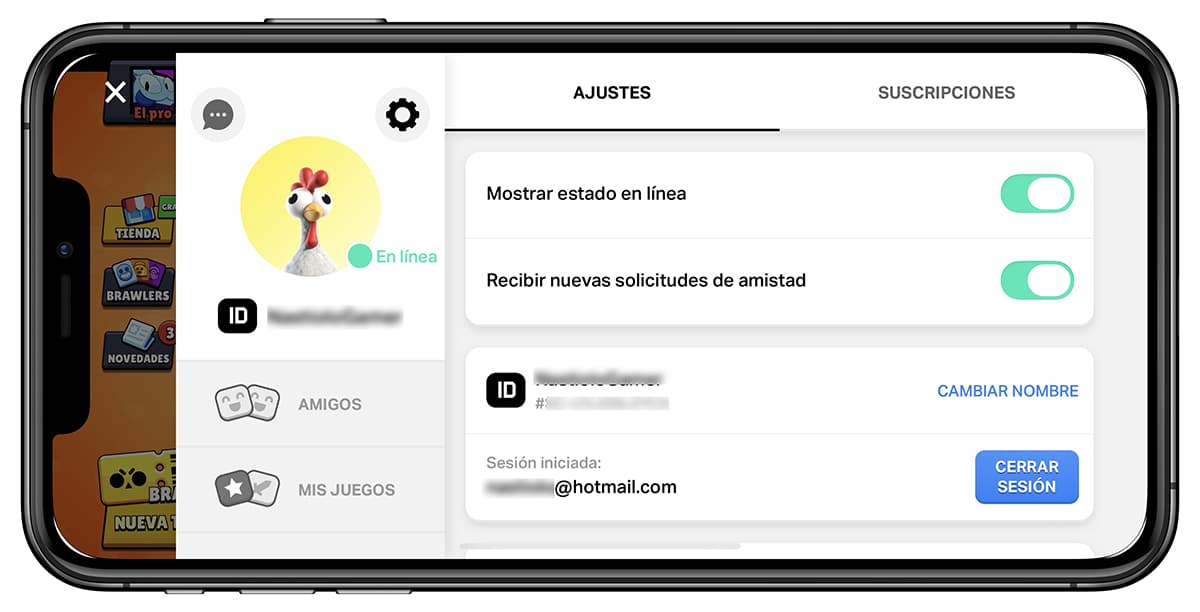
Typically, the main reason for wanting to change your email address is losing access to your original email account. If you still have access to your current account, the process is simple, but if you've lost control of your email, the situation becomes more complex due to the company's strict security measures .
If you wish to change your email address while preserving your current progress, follow these detailed steps:
- Access the first adjustments general information about your in-game account.
- Go specifically to the section where the Supercell ID.
- Click on the icon of the gear wheel (configuration) and, in the logged-in section, select the option LogoutConfirm the action in the pop-up window.
- The game will automatically restart to clear previous login data.
- On the home screen, select the option Create a Supercell ID account (or log in if you already have the new one ready) and enter the new one email you want to link.
- Check your inbox; you'll receive a 6-digit verification codeEnter it into the application to verify that you have access to that new email.
It's crucial to understand that the process varies drastically depending on whether or not you have access to your current inbox. If you don't have access to your old email and the system asks for the code to access the settings, you won't be able to complete this process manually. In that case, you'll need to contact in-game technical support .
However, you should be patient and realistic, as support bots can get stuck in repetitive loops. Many users have reported frustrating experiences where the bot mistakenly assumes the account is locked or lost altogether, even when the player is actively logged into the game on their device. In some cases, the system may flag the account with a suspicious activity alert without providing a clear explanation, further complicating the ownership verification process.
If support is unable to verify your ownership, even if you provide evidence such as in-game purchase receipts or precise account creation details, the most effective and direct recommendation is to try to recover your email account directly with your provider (Gmail, Outlook, Yahoo, etc.) before contacting Supercell. The company typically rejects email changes requested via web forms or external emails for security reasons , insisting that all requests be made through internal support, which can be inefficient if access to the original email address cannot be validated.
How to switch from Google Play Games or Game Center to Supercell ID
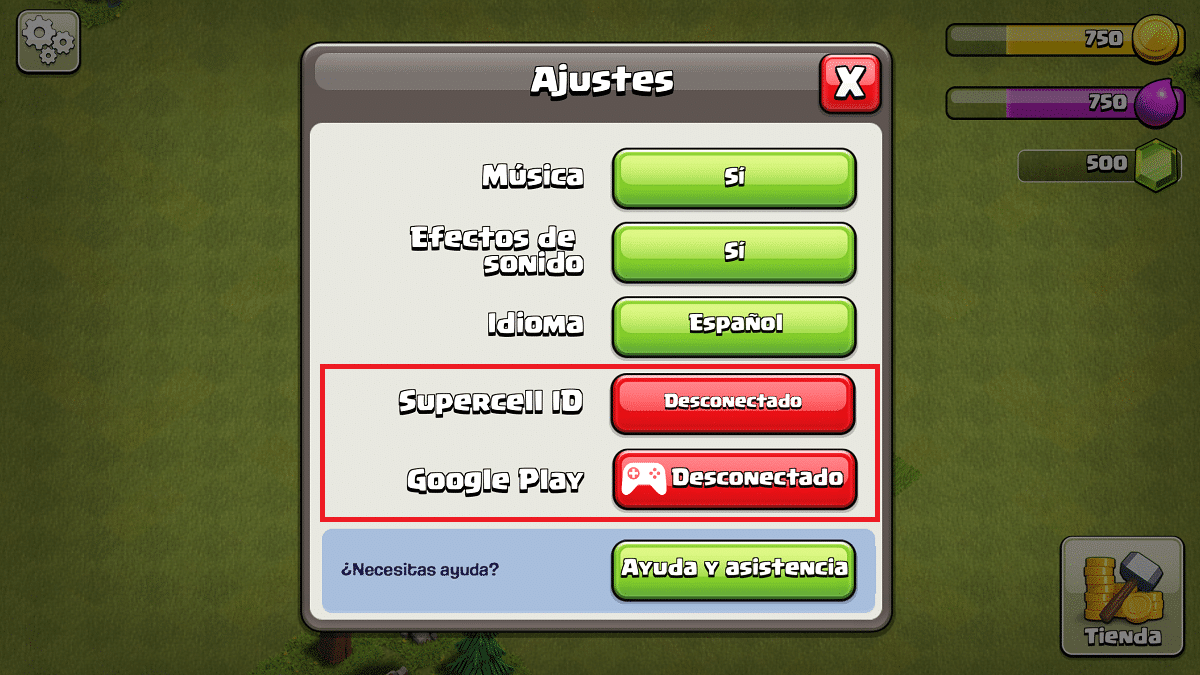
Many users started playing linked only to Google Play Games (Android) or Game Center (iOS). If you want to migrate that progress to a Supercell ID to gain the flexibility to play on any device, the procedure is as follows:
- Enter the adjustments of your favorite Supercell game.
- Look for the connectivity section. You'll see that you're already connected to Google Play or Game Center. Right below or next to it, you'll see the button. Supercell ID.
- Click on the button that indicates Offline next to the Supercell ID option.
- Choose Create a Supercell ID accountEnter the email address you want to use and press accept.
- As in the previous process, introduce the 6 digit verification code which will arrive in your email.
Once this process is complete, your progress will no longer depend solely on your phone's app store, but will be backed up in the Supercell cloud . This system is similar to two-step authentication, but simplified by eliminating the need to remember a password, relying exclusively on email access.
It's important to note that migrating your game is the only sure way to ensure that if you lose your phone or decide to switch brands (from Samsung to Apple, for example), you won't have to start your village or deck from scratch. Native Google or Apple integration is useful, but it's a closed ecosystem that doesn't understand how to communicate with competitors.
How to create a Supercell account from scratch
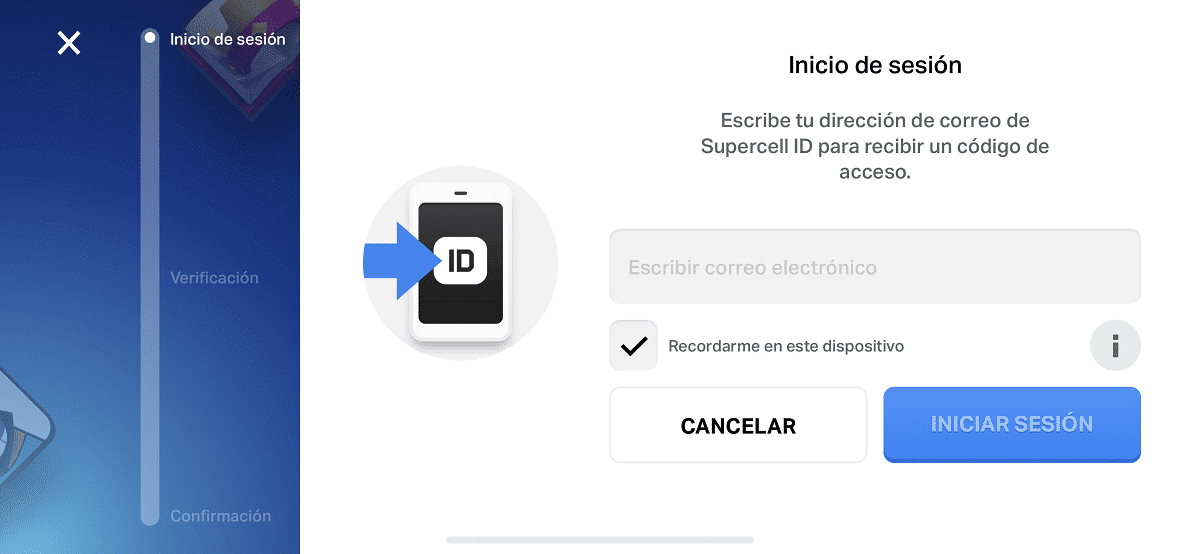
Creating a digital identity in this ecosystem is extremely quick and free. You just need to follow these basic steps:
- Open any game from the Supercell family.
- Tap the button Supercell ID in the settings menu.
- Enter a email valid and active.
- Confirm account ownership by entering the security code which the system will send you automatically.
Once you've created an account for one game, you can connect all your other Supercell titles using the same email address. There's no need to create a separate account for each game; a single Supercell ID can hold the progress for all compatible titles, greatly simplifying the management of your profiles.

This registration process is the basis for later activating account protection , an advanced feature that adds extra layers of security to prevent third parties from accessing your progress even if they manage to compromise your email.
Games compatible with the Supercell ID system

Supercell is known for creating titles that dominate download charts and generate revenue worldwide. The Supercell ID system has been implemented across its most successful franchises to ensure users never lose their investment of time and money.
The games that allow full synchronization of progress and purchases through this system are:
- Brawl StarsFrenetic action in competitive arenas.
- Clash RoyaleReal-time card strategy.
- Clash of Clans: Village building and epic wars.
- Boom BeachIsland conquest and naval combat.
- There Day: Management and growth of a virtual farm.
All of these titles are free and are characterized by their lack of intrusive advertising, basing their model on optional in-app purchases. Thanks to the Supercell ID, any purchase made on an account is linked to the email address and not the device, ensuring that you don't lose your items or gems if you change phones.
For parents and guardians, it's recommended to review the Parent's Guide provided by the company, which details how to manage children's playtime and purchases linked to these accounts. It's a vital tool for preventing unexpected expenses and ensuring a healthy gaming environment.
Having a properly configured Supercell ID account and an active email address is the best way to avoid the stress of losing years of progress. Whether you need to change your email for security, organizational reasons, or simply want to migrate your data between Android and iOS, remember that email access is the key. If you lose access to your email, prioritize recovery through your service provider before attempting to navigate the game's complex support menus, ensuring your mobile gaming legacy remains safe from any technical issues or hardware changes.
Table of Contents
