

Now is the perfect time to buy a tablet, and if you're not sure where to start, we present the ultimate guide to buying a Samsung tablet . With these detailed recommendations, you can take home the right model to meet your needs, whether you're a student, a creative professional, or someone simply looking for entertainment on the couch.
With such a wide variety of options available, determining the best choice can be complicated. Samsung has segmented its catalog to cater to all needs, from maximum savings to raw power. Let's explore more relevant aspects that will help you make a better decision regarding the best Samsung tablet.
How to choose the best Samsung tablet? Key aspects

Tablets are hybrid devices with features similar to a computer or smartphone. However, when choosing a particular model, we must consider technical elements that often go unnoticed. Samsung is a pioneer in high-end technology, offering modern designs and excellent value for money.
What are you going to use your Samsung tablet for?
A professional-grade tablet can cost over €1.000. However, for the average user, this price is excessive if their needs don't require sophisticated power. Therefore, the first question should be: what is my use case?
- Basic and multimedia use: If you just want to browse, read files, use social media, emails and stream, a mid-range tablet is ideal. Models between 290 and 350 euros They are usually sufficient.
- Productivity and work: For those looking to replace a laptop for light tasks or project management, a powerful processor and multitasking support are essential.
- Design and Creativity: If you are going to draw or take notes by hand, it is essential that the model includes the S Pen.
Screen size and panel quality
Samsung offers screen sizes ranging from 8 to 14 inches. Size directly impacts portability and viewing comfort. While a 10- or 11-inch screen is the standard, the 14,6-inch Ultra models are practically portable monitors.
It's vital to differentiate between display technologies. AMOLED and Dynamic AMOLED 2X panels offer vibrant colors and perfect blacks, ideal for cinema and design. On the other hand, LCD or LTPS panels are common in the A and FE series; while very good, they lack the infinite contrast of the S series.
Processor, RAM and Storage
Performance depends on the computer's processor. For smooth operation, look for octa-core processors . High-end models use the latest generation Qualcomm Snapdragon or MediaTek chips, enabling game emulation and demanding video editing.
Regarding memory, we recommend a minimum of 8 GB of RAM to avoid background app crashes. As for storage, while 128 GB or 256 GB are standard, Samsung's major advantage is the microSD card slot , which allows you to expand the capacity up to 1 TB on most models.
Autonomy and Battery
To avoid relying on a charger, consider a battery with a minimum capacity of 8.000 mAh . Larger models can reach up to 11.200 mAh. It's also important to consider the charging speed (some support up to 45W), which drastically reduces waiting time.
Understanding Samsung tablet families
To avoid getting lost in the catalog, it is essential to understand that Samsung divides its devices into four main lines, each with a different objective:
- A series: These are the most affordable options. Ideal for children, seniors, or basic use (YouTube, browsing, reading). They are not usually compatible with the S Pen.
- Lite Series: A middle ground. They offer the essence of the high-end range (like the S Pen) but with more modest hardware. They are the preferred option for students on a tight budget.
- FE Series (Fan Edition): Designed based on user feedback, these laptops offer solid performance for moderate multitasking and drawing, striking the perfect balance between price and power.
- S series: The top of the line. AMOLED screens, powerful processors, and seamless integration with the Galaxy ecosystem. They're designed for professionals, gamers, and demanding users.
Why use a Samsung tablet for work?
With the rise of hybrid work, these tablets have become professional tools thanks to several competitive advantages:
- Extreme portability: Much lighter than a laptop, allowing you to work on airplanes, in cafes or meetings.
- DeX Mode: This feature transforms the tablet interface into a PC desktop-like experience, allowing you to manage floating windows and use a keyboard and mouse.
- S Pen and Samsung Notes: The ability to handwrite, outline ideas, and digitally sign PDFs speeds up any workflow.
- Real multitasking: Through Multi WindowYou can run up to three applications simultaneously on screen.
Detailed analysis of the best Samsung tablet models

Below, we break down the most outstanding models, analyzing their strengths and who they are designed for.
Samsung Galaxy Tab S10 Ultra and S10+
The Galaxy Tab S10 Ultra is the absolute flagship. With a 14,6-inch Dynamic AMOLED 2X display, it features anti-glare technology and Vision Booster for optimal visibility in sunlight. Its ultra-fast processor enables a PC-like workflow.
Highlights include the integration of Galaxy AI , which allows for instant PDF translation, text summarization, and the ability to solve complex mathematical formulas with the Solve Math feature. It also boasts a massive 11.200 mAh battery and IP68 certification for water and dust resistance.
The Galaxy Tab S10+ maintains the same power and processor, but in a more manageable 12,4-inch format, making it the ideal option for those who want professional power without such an excessive size.
Samsung Galaxy Tab S9 FE and FE+
Considered the best value-for-money tablet , the FE series offers a 10,9-inch screen (or 13,1 inches in the FE+) with a 90Hz refresh rate. Although they use LCD panels instead of AMOLED, their performance is excellent for students and intermediate users.
They include the S Pen as standard and are splash-resistant. They can handle moderate photo and video editing, making them the most sensible option for most people.
Samsung Galaxy Tab S8+ and S8 Ultra
The Galaxy Tab S8+ offers a 12,4-inch AMOLED display, 8GB of RAM, and 256GB of storage. It's perfect for multimedia consumption and moderate productivity tasks. Meanwhile, the S8 Ultra remains a performance powerhouse with its 14,6-inch display and up to 16GB of RAM, ideal for demanding workloads.

Samsung Galaxy Tab A9+ and A8
If you're looking for the best budget tablet , the Galaxy Tab A9+ is the answer. With an 11-inch screen and 3D surround sound, it's ideal for web browsing and streaming. Its 8GB of RAM ensures the system won't slow down during everyday tasks.
The Galaxy Tab A8 , with its 10,5-inch screen and 4GB of RAM, is a simpler but highly efficient model for reading and basic office tasks. Both models stand out for their slim metal design and Samsung Knox security , which protects data against malware.

Samsung Galaxy Tab S6 Lite
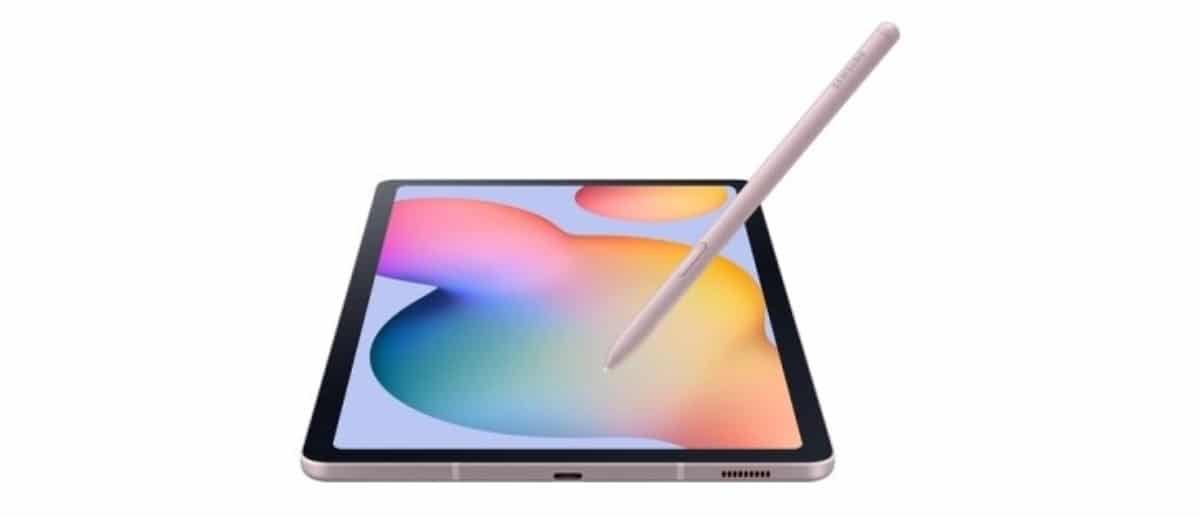
The Tab S6 Lite is one of the most versatile devices for students. Its 10,4-inch screen and the inclusion of the S Pen make it ideal for taking notes and making simple sketches. Although its hardware is modest (4 GB of RAM), its lightweight design makes it perfect for carrying in any backpack.

Quick guide: Which Samsung tablet do I need based on my profile?
To simplify your choice, we've categorized the models according to user type. Remember that, when in doubt, always prioritize RAM , as this ensures a longer device lifespan.
- Basic user: (Browsing, social media, email). Recommendation: Galaxy Tab A9+It's economical and more than fulfills these tasks.
- Multimedia User: (High-quality movies, series, and music). Recommendation: Galaxy Tab S8 +Its AMOLED screen and superior audio create an immersive experience.
- Intermediate User/Student: (Documents, study, moderate drawing). Recommendation: Galaxy Tab S10 FEPerfect balance between performance and price.
- Gamer: (Demanding video games, emulation). Recommendation: Galaxy Tab S9 FE or S seriesYou need the highest processing power and a smooth refresh rate.
- Professional User: (Video editing, graphic design, laptop replacement). Recommendation: Galaxy Tab S10 UltraThe ultimate in RAM, processor, and screen size.

Knowing your intended use is key to avoiding overspending or falling short on power. If you have questions about a specific model or want to know if an older tablet is still a viable option, leave us a comment and we'll personally advise you to find the device that perfectly suits your needs and budget.
Table of Contents