

The use of voice notes on WhatsApp has become essential in our daily communication due to its speed and immediacy. However, there are everyday situations where listening to them is impossible: we're in a work meeting , in a noisy place, or we've simply received an excessively long audio message that we can't process at that moment. Furthermore, for people with hearing impairments or microphone problems on their device, these recordings can present a barrier.
Fortunately, there are several solutions for transcribing WhatsApp audio to text . From the app's native integration to third-party tools powered by artificial intelligence , it's now possible to read any voice message in a matter of seconds, guaranteeing both privacy and efficiency.
How to transcribe audio using WhatsApp's native function

WhatsApp has implemented an official tool that allows you to convert voice messages to text directly within the chat. The main advantage of this system is that the transcriptions are generated locally on the device, meaning the content never leaves the phone and remains protected by end-to-end encryption.
To activate this feature, you must follow these detailed steps:
- Accede to Settings (on iOS) or tap the three dots in the top right menu and go to Settings (on Android).
- Enter the section Cat.
- Look for the option Voicemail Transcripts and activate it.
- Select the language where most of the audio you receive is located (currently supports Spanish, English, Portuguese, Russian and Hindi, with plans to expand).
Once set up, to view the text of an audio message, simply press and hold the message and select the Transcribe option from the pop-up menu. The text will appear just below the play icon. This tool is ideal for casual use and short messages, although it has limitations such as the inability to easily export the text or the difficulty in reading very long messages.
External apps for transcribing voice notes on Android
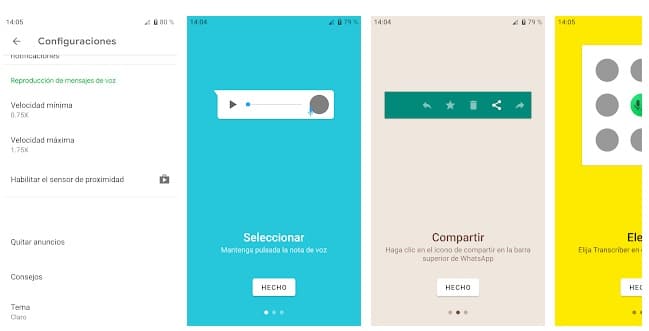
For those seeking more advanced features or using WhatsApp versions that don't yet have the native function, there are specialized apps. One of the most notable is Transcriber for WhatsApp , which allows you to quickly and efficiently convert audio to text.
Transcriber overlays the WhatsApp interface, allowing the chat to remain open while the text is being processed. It's especially useful for copying and pasting content into other apps. To use it, simply install it, choose your language, and within WhatsApp, use the Share over Audio feature , selecting the Transcriber app.
Another powerful alternative is Textr – Voice Message to Text . This application supports up to 71 languages , including Catalan, and has no time limit for the duration of voice notes, although it requires an internet connection to function properly.


Options for iPhone (iOS) users

For Apple users, in addition to WhatsApp's built-in transcription feature, there are several highly effective apps. Trascrypto is one of the most robust options, capable of transcribing audio from various platforms like Telegram and WhatsApp in over 50 languages. It works simply by sharing the audio file with the app.
Another alternative is Audio to Text for WhatsApp , which stands out for its ability to work without an internet connection and its compatibility with multiple messaging services, facilitating the management of voice notes without depending on the network.
Professional solutions with Artificial Intelligence: Plaud

If you need a tool for work environments, academic settings, or managing large volumes of information, AI-powered devices like Plaud are the best option. Unlike simple apps, Plaud uses dedicated hardware and an AI app to organize information.
The process involves connecting the device via Bluetooth, playing the audio through a speaker while Plaud records, and obtaining the transcription in the app. Its advantages are disruptive:
- Massive language supportMore than 112 languages available.
- Automatic summaries: AI not only transcribes, but also synthesizes the key points of the audio.
- Professional export: Allows you to save texts in PDF or TXT format or send them by email.
- OrganisationIdeal for converting work instructions or appointments into structured documents.
Comparison: Native WhatsApp vs. AI Tools

To choose the best option, it's important to analyze the user's needs. WhatsApp's native messaging feature is ideal for quick, everyday use, as it requires no installation and is completely private. However, it is limited in terms of languages and export capabilities.
On the other hand, tools like Plaud or Textr are superior when multilingualism is required , the ability to archive information, or when the audio is excessively long and requires a summary to save reading time.
Audio transcription is a fundamental accessibility tool . It not only solves the inconvenience of not being able to listen to audio on public transport or in an office, but also allows people with hearing difficulties to fully participate in digital conversations, eliminating their reliance on active listening.
Converting voice notes to text optimizes time and improves productivity, allowing us to manage communication flexibly according to the environment and the urgency of the message received.

Table of Contents
