

Designing a house doesn't have to be complicated, at least not that complicated. There are many apps that can help you with the process, but not all of them are equally good, nor do they all have the necessary features to bring your ideas to life. However, there are several options that promise to be the best house design app for Android . Here, we'll list some of the most interesting house design apps you can download to your Android phone. One of them might just be the one that helps you design the house of your dreams. Find out which one!
On this occasion we will list some of the most interesting apps to design houses that you can download on your Android mobile. One of them may be the one that will help you design the house of your dreams. Find out which one!
The following applications for designing houses that we list below are available in the Play Store for free. Despite this, it is possible that one or more have an internal micropayment system that allows you to unlock more advanced functions and eliminate advertising. That said, let's take a look...
How do house design apps work and what should you keep in mind?
Before these apps, decorating or designing a house meant either imagining everything in your head or using expensive design software. Today, technology offers tools that allow us to visualize our homes, try out different combinations, and avoid costly mistakes before moving a single piece of furniture. Most of these apps let you create a realistic floor plan of your house with precise measurements, helping you determine if there's enough space for that sofa or table you love.
The use of 3D and augmented reality (AR) offers numerous advantages: it provides a sense of realism and volume, allows you to "walk" through the simulated house, and helps you understand exactly which spaces you want to occupy and the most efficient way to do so. Unlike typical, more abstract floor plans, three-dimensional visualization brings you closer to the final result. Furthermore, many apps work offline, allowing you to design anytime, anywhere.
When choosing an app, consider your experience level, the tools you need, the ability to export designs, and the pricing model (free with ads, in-app purchases, or subscriptions). Also, consider whether you prefer a simple interface for beginners or more technical software for professionals. Below, we present the best options available for Android.
Floor Plan Creator
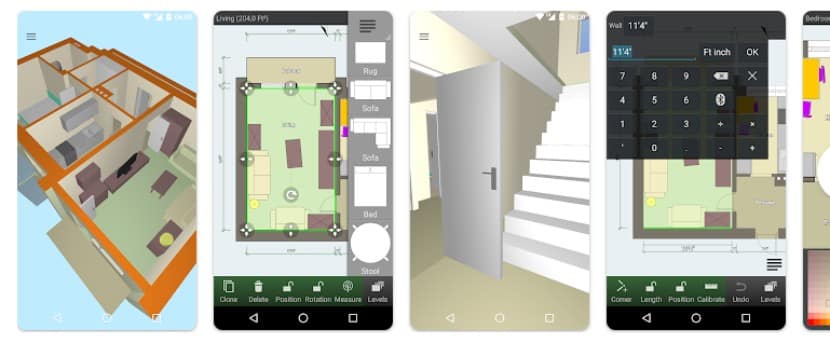
Floor Plan Creator is perhaps the best house design app for Android . This app is not only one of the most comprehensive, but also one of the most downloaded and popular in its category. With over 10 million downloads on the Play Store, it has established itself as a top choice for creating floor plans that serve as a reference when designing houses and apartments with all kinds of elements such as stairs, doors, windows, and more.
It has a very simple interface that will help you design your dream home , regardless of whether you have prior knowledge of design and blueprints or not. You can create 3D plans with this application in just a few minutes to bring your vision to life. It comes with various features that help you determine the perimeter of marked areas. It also allows you to take a 3D walkthrough of your designed plans. In addition, it includes a symbol library to help you identify each element of the house, such as doors, furniture, windows, electrical wiring, and more. Furthermore, it is compatible with the S-Pen stylus and mouse, making it easier to design your house plans.
On the other hand, Floor Plan Creator has support for exporting designs as images or PDF, DFX and SVG files. It also allows you to upload projects to the cloud to make backup copies of them.
- Advantages: Intuitive interface even for beginners, large number of available elements, export to multiple formats, compatibility with S-Pen and mouse, cloud backups.
- Disadvantages: The free version includes advertising and some advanced features may require in-app purchases.


3D Room Designer
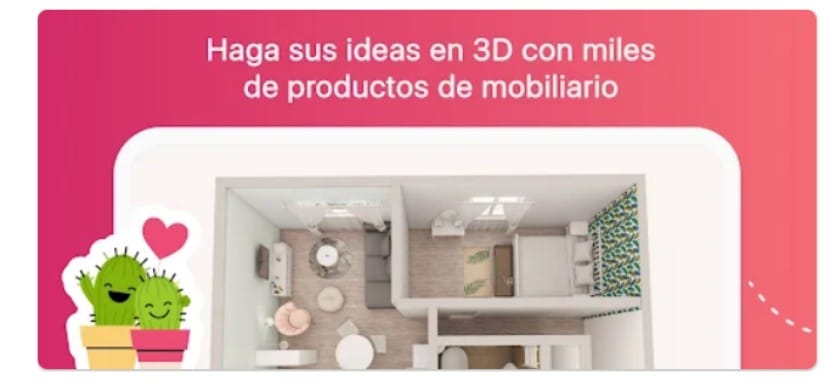
3D Room Designer is another excellent tool for designing houses and buildings with precision and detail. This app also stands out as one of the best and most comprehensive of its kind. It's not only perfect for designing houses and apartments, but also for remodeling, renovating, and decorating interiors, as it will help you easily and quickly conceptualize what you have in mind. No matter what ideas you have, with this app you can bring them to life and then unleash them.
If you want to see what your ideal home concept would look like, this app will help you. Stop imagining it and bring it to life in 3D with this tool. You can share your designs with friends, family, and even the builder, engineer, architect, or designer who will make your ideas a reality. A wide variety of pre-designed templates are available for creating floor plans and rooms for your apartment. You can also add furniture and decorations to the designs to give them a more realistic touch. Add people, paintings, and many other elements to simulate how everything will look in the final product. You can use this app with or without an internet connection, as it includes an offline mode.
This app also offers advice from designers who suggest ideas for your project, and its 3D furniture catalog lets you choose from a wide variety of styles. It's ideal for those seeking inspiration and wanting to experiment with different layouts without making a commitment.
- Advantages: Pre-designed templates, offline mode, 3D furniture catalog, ability to share designs, designer advice.
- Disadvantages: Some features require a subscription or in-app purchases; the interface may seem overwhelming at first.

HomeByMe
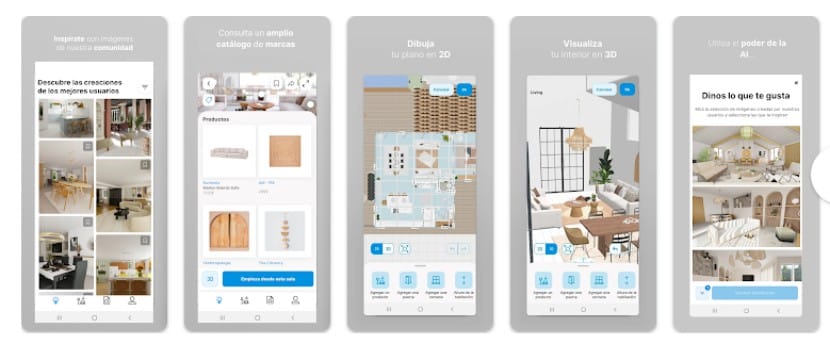
If you're thinking about furnishing your home or undertaking any renovations or remodeling, this app has everything you need. Of course, it's also perfect for designing homes and creating floor plans, as it has a wealth of tools dedicated to floor planning. With HomeByMe, you have an app for creating 3D floor plans of any room or space. Thanks to its user-friendly interface, you'll quickly and easily bring your ideas to life. You can also create 2D floor plans if you prefer. Plus, you can find inspiration in floor plans created by other users and those available in the HomeByMe catalog.
But there's more. This is one of the few AI-powered house design apps. You can browse other users' designs and tell the app what you like or dislike about them, and then the magic happens. You can save your projects to send and share them via apps and social networks like WhatsApp, Gmail, LinkedIn, Messenger, X (formerly known as Twitter), Skype, Drive, and Discord.
HomeByMe stands out for its extensive library of over 20.000 furniture and home decor items from real brands like Maison du Monde, Wayfair, La Redoute Intérieur, Westwing, and many more. It includes the Magic Furnish feature , which automatically furnishes rooms, and allows you to create custom collections. The renderings are high-quality and very realistic. You can work on your projects online or offline and collaborate with others in real time.
- Advantages: Huge catalog of furniture from well-known brands, realistic renderings, automatic furnishing function, real-time collaboration, offline work option.
- Disadvantages: The free version is limited; high-quality rendering and some advanced features have an additional cost; occasionally, it may have measurement errors or slow loading speeds.

magic plan
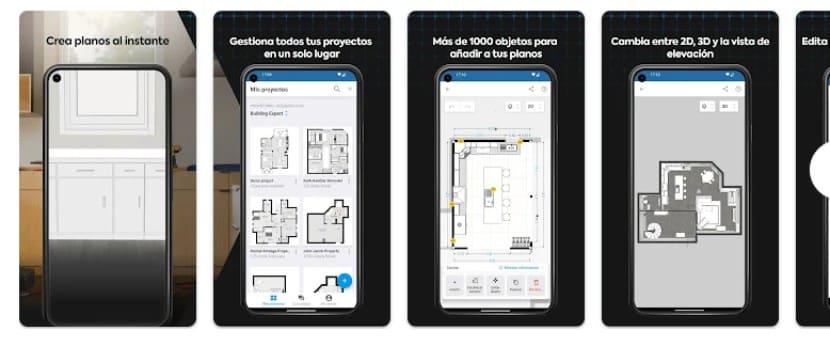
Of all the house design apps, this is one of the most professional you can download right now on your Android phone. Magicplan is an app that, like the ones listed above, lets you create floor plans and designs quickly and easily, right from your phone, just like an architect. It features over 1.000 elements, objects, and symbols that will help you refine all your ideas in much greater detail, which you can visualize in 2D and 3D, as well as in elevation views. It also includes a function that helps you estimate construction costs based on the created plans and their respective elements.
Magicplan stands out for its ability to scan rooms using your mobile phone's camera and augmented reality , which speeds up the creation of floor plans. It also allows you to calculate the estimated cost of a project, including materials, furniture, and services such as painting or installation. You can enter quantities and unit prices to obtain an automatic quote, and apply taxes or discounts. It also offers collaboration among multiple users and report generation. It's a highly valued tool among contractors, real estate agents, and designers.
- Advantages: AR scanning for quick plan creation, cost estimation, collaboration, professional reports, and a large library of elements.
- Disadvantages: Camera measurements can be inaccurate; 3D editing is limited compared to other apps; more advanced features require an expensive subscription (the professional plan can cost over $80 USD per month).

5D Planner – Interior design
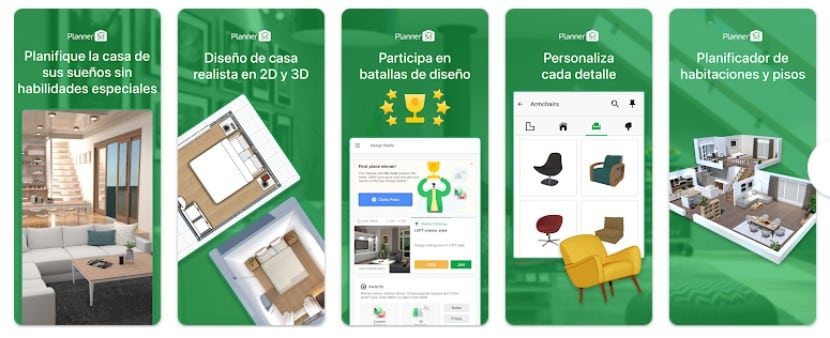
Perhaps the best app for designing houses is Planner 5D – Interior Design. If none of the ones we listed above have convinced you, it is likely that this app will. It is one of the best apps of its kind, and you can download it for free through the Play Store. It has a repertoire of more than 6.200 elements and decoration objects to make 2D and 3D house plans with unparalleled realism. Whether you want to design houses and apartments, or rebuild and remodel them, with this app you can do it with incomparable ease.
Planner 5D is one of the most popular apps, with over 40 million users and 300 million projects created. It offers AI-powered tools like Smart Wizard, Design Generator, and AI floor plan recognition. You can create floor plans from scratch or use templates, furnish with over 10.000 items, design exteriors and landscaping, and use advanced CAD tools. It also includes augmented reality to configure designs with your room's actual dimensions and view them in real size. The community is very active: you can participate in weekly design battles, share your projects, and get inspiration from other users. It's available on web, iOS, and Android.
- Advantages: Intuitive drag-and-drop interface, AI tools, large furniture library, 2D and 3D modes, augmented reality, active community, available on multiple platforms.
- Disadvantages: The free version is limited; measurements are not always accurate; it is not suitable for complex architecture; the subscription model can be expensive (up to $50 USD per month in some plans).

Other notable apps for designing houses on Android
In addition to the five apps mentioned above, there are other very interesting alternatives that may be better suited to your specific needs. Below, we present the most relevant ones.
Live Home 3D
Live Home 3D is one of the most comprehensive apps for both professionals and beginners. It allows you to create detailed floor plans, furnish spaces with a wide catalog of 3D models, and visualize projects with a high level of realism . You have complete control over lighting, materials, roofing, and virtually every detail. Once the design is finished, you can share the results through images, video walkthroughs, or photorealistic renders. It's available on multiple platforms (macOS, iOS, Windows, Android, and even visionOS) and incorporates augmented reality (AR) walkthroughs. It offers a one-time purchase option with no mandatory subscription and unlimited renders even in the free version. The free version allows only one project, and some advanced features require a learning curve. There is no web version.
- Advantages: Fully customizable, advanced tools, cross-platform, realistic rendering, AR/VR compatibility, one-time purchase, works offline.
- Disadvantages: The free version is limited to one project, has a learning curve for advanced features, and does not have a web version.
Homestyler
Homestyler is a powerful cloud-based interior design tool that lets you create engaging visual presentations using 3D models and interactive walkthroughs. Its intuitive drag-and-drop system makes it ideal for decorating spaces and presenting design ideas. It's especially useful for beginners who want to quickly and easily visualize room layouts. It allows you to create virtual rooms, experiment with different paint colors, and easily add 3D furniture. It includes AR/VR visualization, a large library of furniture and materials, and an active community. It's ideal for creating mood boards and developing visual concepts. However, it's limited for technical architectural design, some key features require payment, and it can slow down on large projects.
- Advantages: Intuitive interface, AR/VR visualization, extensive library, ideal for mood boards, active community.
- Disadvantages: Limited for technical design, key functions restricted to paid use, may slow down on large projects.
SketchUp
SketchUp is a professional 3D modeling tool widely used by architects, interior designers, construction professionals, and landscape architects. It offers advanced tools for creating detailed models, photorealistic visualizations, and a broad ecosystem of extensions. These include 3D Warehouse (a library with millions of 3D models), Extension Warehouse (over 600 extensions for automating tasks), and Trimble Connect for cloud-based collaboration and file management. It is available in both web and desktop versions. It can be complex for beginners, and its subscription is relatively expensive. It is ideal for professional architectural projects and urban planning, but hobbyists may prefer more affordable alternatives.
- Advantages: Advanced 3D modeling tools, photorealistic visualization, extensive ecosystem of extensions, web version available.
- Disadvantages: Complex for beginners, expensive subscription, requires time and experience to master.
Houzz
Houzz is geared towards inspiration, shopping, and basic planning tools . One of its most prominent features is access to over 25 million high-quality interior design images across various decorating styles. It allows you to search for and purchase furniture and home goods, and even visualize how they would look in your space thanks to the View in My Room 3D (augmented reality) feature. You can also hire professional designers, read expert content, and receive advice from the community. It's free, but it doesn't include professional design tools; its focus is decidedly commercial and it relies on an internet connection. It's excellent for finding inspiration and buying furniture, but not for creating projects from scratch.
- Advantages: Free, huge image library, direct connection to designers, integrated shopping, AR viewing.
- Disadvantages: It does not include professional design tools, has a commercial focus, and requires an internet connection.
RoomSketcher
RoomSketcher is an intuitive application for easily creating floor plans, interior layouts, and 3D designs of homes. It is widely used by real estate agents, designers, and planners to visualize spaces professionally. It allows you to create 2D and 3D plans, add measurements and annotations, customize furniture and materials, and perform real-time 3D walkthroughs. One of its most notable features is the Redraw service , which allows you to upload a sketch and receive a professional digital floor plan created by the RoomSketcher team (at a standard cost of $38 USD per floor). It works on computers and tablets, although some users have reported technical issues. The free version is limited, and advanced features are available for a fee. It is not ideal for complex structures.
- Advantages: Easy to use, precise measurements, 3D visualization, Redraw service, ideal for real estate agencies and designers.
- Disadvantages: Limited free version, advanced features available for a fee, not ideal for complex structures, may experience technical issues.
Home Planner (formerly Room Planner)
Home Planner is a powerful interior design app that allows you to efficiently visualize and plan spaces . It offers the ability to create interiors and floor plans from scratch or work with existing projects in various decorative styles. One of its main advantages is its extensive catalog of furniture and decorative items from real brands like IKEA , which facilitates the creation of realistic designs. It is widely used by homeowners thanks to its intuitive interface, offline functionality, and integrated social component (Explore tab) for sharing designs, commenting, liking, saving, and directly editing other users' rooms. Advanced features are paid and limited for complex projects.
- Advantages: Simple drag-and-drop interface, furniture from well-known brands, 2D and 3D views, works offline, social component.
- Disadvantages: Advanced paid features, limited for complex projects.
Home AI
Home AI functions as an AI-powered interior design assistant . Simply upload a photo of your room, choose a style, or enter a brief description, and the app will instantly generate multiple design proposals with coordinated furniture, color palettes, and layouts. It offers over 10 decorating styles, such as modern, minimalist, and zen. Extremely fast and easy to use, it's ideal for users with no design experience. Unlike other apps, it doesn't allow you to edit floor plans, manually place furniture, or have precise control over the design. However, it's perfect for visualizing styles, creating mood boards, and generating decorating ideas instantly. It may also alter room structures in unrealistic ways.
- Advantages: Immediate results, very easy to use, wide variety of styles, ideal for inspiration.
- Disadvantages: It does not allow 3D editing, can alter structures in an unrealistic way, and is not suitable for technical drawings.
IKEA Place and IKEA Home Planner
IKEA offers two useful apps: IKEA Place uses augmented reality so you can see how the store's furniture will look in your home before you buy it. It includes a wide range of 3D models and provides detailed information on each product (size, materials, price). It's limited to IKEA products and may have some AR accuracy issues. On the other hand, IKEA Home Planner lets you decorate your home with products from the Nordic brand using both 2D and 3D modes. It's a simple and free option for planning spaces with IKEA furniture.
Moblo 3D
Moblo 3D goes even further: it lets you model and draw custom furniture with your fingers. Thanks to augmented reality, you can see your ideas come to life. It's ideal for those who want to fully personalize their furniture and also for more complex interior designs.
Complementary apps for specific tasks
There are other applications that, while not complete planners, are very useful in the design and decoration process:
- Paint Tester: Take a picture of the wall and change the color to see how it will look before painting. This allows you to try different shades until you find the perfect one.
- Photo Measures: Take a photo of a space or object and mark the exact measurements on the image. Available in a free Lite version and a paid version, in Spanish.
- Snapshop Showroom: Superimpose store furniture onto a photo of the room to see how it would look before buying it.
- Pallets: Create color palettes from objects to achieve the best combination. Available on iOS.
- iHandy Level: A level for hanging pictures and shelves perfectly straight. Free on Google Play and the App Store.
- Adobe Capture CC: Take photos and create vectors or color palettes to define the color scheme of your home.
- Home Design 3D: A complete app for decorating, rearranging, or designing homes in 2D and 3D, with offline mode and tutorials. Available in Spanish for iOS and Android.
Tips for choosing the best app for designing houses
With so many options available, choosing the right one can be overwhelming. Follow these tips to make the right decision:
- Define your level of experience: If you're a beginner, look for apps with intuitive interfaces and tutorials (Planner 5D, Home Planner, Homestyler). If you're experienced, opt for professional tools (SketchUp, Live Home 3D, magicplan).
- Identify your needs: Do you want just inspiration (Houzz), accurate floor plans (Floor Plan Creator, RoomSketcher), realistic renderings (HomeByMe, Live Home 3D) or cost estimates (magicplan)?
- Consider the pricing model: Many apps are free with ads and in-app purchases. Others offer subscriptions or one-time purchases. Carefully read the limitations of the free version.
- Value exporting and storage: Do you need to export plans as PDFs, images, or CAD formats? Do you want to save your projects in the cloud? Check it out before you decide.
- Try several applications: The best way to find out which one suits you is to download two or three and experiment with them. Most are free, so you have nothing to lose by trying.
Frequently asked questions about apps for designing houses on Android
What is the best app for designing houses on Android?
There isn't one single best app, as it depends on your needs and experience level. Planner 5D is one of the most popular and well-rounded options for beginners; Floor Plan Creator stands out for its accurate floor plans; magicplan is ideal for professionals who need to estimate costs; and Live Home 3D offers great realism and advanced tools. Try several and choose the one that best suits your workflow.
Can I design my house plans for free?
Yes, many apps offer free versions with enough features for basic projects. Floor Plan Creator, Planner 5D, Home Planner, and Homestyler all have free options, though with limitations (advertising, fewer elements, paid advanced features). For more complex projects or high-quality renderings, you'll likely need a subscription or in-app purchase.
Do these apps work without an internet connection?
Some do. 3D Room Designer, HomeByMe, Live Home 3D, and Home Planner allow offline use, which is useful if you don't have a stable connection. However, features like collaboration, cloud synchronization, and product purchases require an internet connection.
Can I use these apps to design the exterior of my house?
Yes, several apps allow you to design exteriors and landscaping. Planner 5D includes specific tools for gardens, patios, and outdoor living areas. Live Home 3D also allows you to create highly realistic outdoor spaces. Other apps are more focused on interiors, but can be useful for arranging elements on balconies or patios.
Are they suitable for architecture professionals?
Some do, such as SketchUp, magicplan, RoomSketcher, and Live Home 3D , which offer advanced tools, precise measurements, and export to professional formats. However, for complex architectural projects, you'll likely need specialized desktop software. These apps are useful for sketching, quick planning, and visualization.
How can I choose the best free interior decorating app?
If your goal is to decorate interiors without spending money, Planner 5D, Homestyler, and Home Planner are excellent options. They allow you to create floor plans, try out furniture, and visualize in 3D with a fairly comprehensive free version. Houzz is ideal if you're looking for inspiration and to buy products, though not so much for designing from scratch. For testing colors, Paint Tester is a simple and free alternative.
In short, the range of house design apps for Android is vast and varied. From simple tools for beginners to professional solutions with cost estimation and photorealistic renderings, there's an option for every need and budget. The best approach is to try two or three of the apps mentioned , experiment with their free features, and discover which one best suits your workflow. Careful planning before starting a renovation will not only help you save money but also optimize your time and avoid unnecessary mistakes. With the right app, designing your dream home is right at your fingertips.
Table of Contents
- 1 How do house design apps work and what should you keep in mind?
- 2 Floor Plan Creator
- 3 3D Room Designer
- 4 HomeByMe
- 5 magic plan
- 6 5D Planner – Interior design
- 7 Other notable apps for designing houses on Android
- 8 Tips for choosing the best app for designing houses
- 9 Frequently asked questions about apps for designing houses on Android
- 9.1 What is the best app for designing houses on Android?
- 9.2 Can I design my house plans for free?
- 9.3 Do these apps work without an internet connection?
- 9.4 Can I use these apps to design the exterior of my house?
- 9.5 Are they suitable for architecture professionals?
- 9.6 How can I choose the best free interior decorating app?